

In my experience of growing a SaaS business through SEO, I’ve found several tools invaluable -but that doesn’t mean you need to subscribe to all of them.
This guide covers the best SEO tools I currently use (or have tried recently) including what each one does best, who it suits, where it falls short and how much it costs.
You can also use the interactive comparison table to quickly find the tools that best match your requirements.
Best SEO tool for SaaS comparison table
Choose a category and priority level to narrow down the list.
| Tool | Category | Best for | Pricing | Priority level |
|---|---|---|---|---|
 RevPages RevPages | Keyword research | SaaS teams prioritising SEO opportunities by potential revenue | Free during early access | Very Helpful |
| LowFruits | Keyword research | Newer SaaS sites finding achievable, low-competition keywords | $30–$80 p/m; reduced annual plans | Very Helpful |
| Keyword Insights | Keyword research | Content teams clustering keywords into an organised page plan | $58–$99 p/m; 20% annual discount; PAYG available | Very Helpful |
| Google Keyword Planner | Keyword research | Marketers accessing free keyword demand and advertising data | Free with a Google Ads account | Very Helpful |
| Ahrefs | SEO platform | Experienced teams researching keywords, competitors and backlinks | $129–$1,499 p/m | Essential |
| Semrush | SEO platform | Larger teams combining SEO with paid and wider marketing research | $139–$549 p/m; 17% annual discount; enterprise plans available | Very Helpful |
| SE Ranking | SEO platform | Smaller teams wanting broad SEO functionality at a lower price | $59–$239 p/m; 20% annual discount | Very Helpful |
| Clearscope | Content | Content teams creating consistent, search-optimised briefs and articles | $129–$399 p/m; 14-day trial; enterprise pricing available | Very Helpful |
| Surfer | Content | Writers optimising new and existing content against leading results | $158–$299 p/m; free trial; reduced annual plans | Very Helpful |
| MarketMuse | Content | Enterprise teams planning topical authority across large content libraries | Custom pricing; historically $99–$400 p/m | Luxury |
| Outrank | Content | Busy teams automating SEO content production and publishing | $99 p/m; reduced annual plan | Luxury |
| BuzzStream | Link building | PR and SEO teams managing outreach contacts and relationships | $49–$999 p/m | Very Helpful |
| Pitchbox | Link building | Agencies running large-scale link-building and outreach campaigns | $210–$825 p/m; 30% annual discount | Luxury |
| Screaming Frog | Technical SEO | Experienced marketers running comprehensive technical website audits | $279 per year; free for up to 500 URLs | Essential |
| Sitebulb | Technical SEO | Teams wanting technical audits with clearer explanations and visuals | Varies by crawl capacity, projects and collaboration needs | Very Helpful |
| PageSpeed Insights | Technical SEO | Any SaaS team checking page speed and Core Web Vitals | Free | Essential |
| LLMrefs | AI visibility | SaaS teams tracking brand visibility across leading AI platforms | £79 p/m | Very Helpful |
| Peec AI | AI visibility | Teams comparing AI visibility, competitors and citation sources | €70–€360 p/m | Luxury |
| OtterlyAI | AI visibility | Small teams beginning to monitor AI mentions and citations | $29–$489 p/m; 15% annual discount | Very Helpful |
| Ahrefs Brand Radar | AI visibility | Ahrefs users combining AI visibility with wider SEO intelligence | From €170 p/m | Luxury |
| Google Search Console | Analytics | Every SaaS website measuring Google visibility and indexing | Free | Essential |
| Google Analytics | Analytics | Every SaaS team measuring organic traffic, behaviour and conversions | Free | Essential |
| AccuRanker | Analytics | Established and international teams needing specialist rank tracking | €224–€764 p/m; reduced annual and enterprise plans | Luxury |
SaaS SEO isn’t just about finding high-volume keywords and publishing blog posts for traffic. You need to reach potential customers throughout a longer buying journey, compete in crowded software categories and identify the pages most likely to generate trials, demos and revenue. The right tools help you research those opportunities, prioritise them properly and turn them into content that attracts customers – not just traffic.
I used SEO to grow my previous SaaS business, StandOut CV, to more than 18 million organic visits, 23,000 paying customers and over £1 million in subscription revenue. I’ve since launched LinkQuest (a SaaS SEO agency) and built RevPages, an SEO platform that helps SaaS teams find and prioritise revenue-generating search opportunities. The tools in this guide are based on the tools I’ve used in my SaaS SEO journey.
Keyword research and opportunity discovery
The best tools for finding valuable SaaS search opportunities and assessing their commercial potential.
RevPages
Best for: Finding and prioritising revenue-generating SEO opportunities
RevPages is an SEO platform for teams who need to generate revenue quickly from organic search.
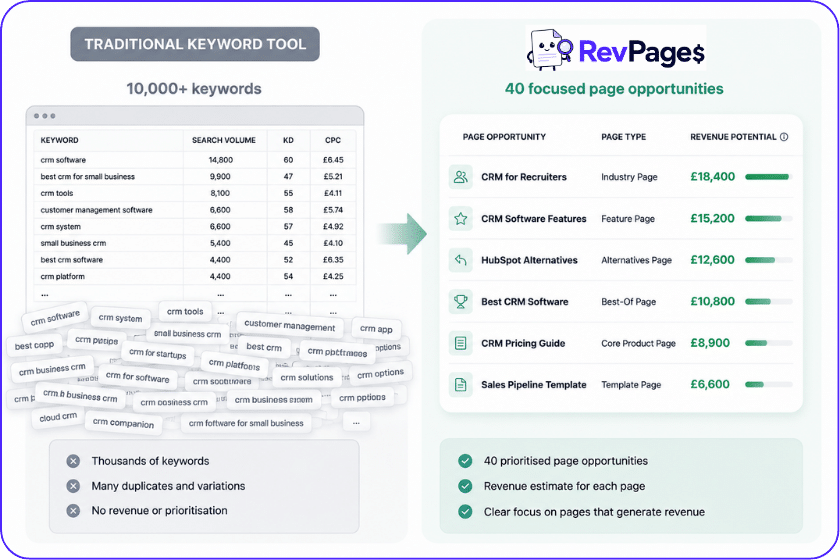
Instead of generating thousands of keywords for marketers to analyse manually, it identifies the handful of commercially valuable pages a SaaS business needs, forecasts their potential revenue and prioritises them according to value and ranking achievability.
Users enter their website, target market and average customer lifetime value. RevPages then analyses the business, its existing rankings, competitors and keyword data to uncover lower-funnel opportunities such as alternative pages, comparisons, industry landing pages, best-of lists – and helps them create content to rank for them
Features
- SEO opportunity discovery: Analyses a website and product to uncover commercially relevant keywords and page ideas, with a particular focus on searches that indicate stronger buying intent.
- Keyword revenue forecasting: Combines search demand, expected click-through rates, estimated conversion rates and customer lifetime value to forecast the potential monthly revenue of each opportunity.
- Opportunity prioritisation: Scores opportunities according to their potential revenue, keyword difficulty, competitive landscape and the website’s existing search position.
- Existing-page analysis: Identifies keywords and pages that already rank, then estimates the additional revenue that could be available by improving their positions.
- Revenue-focused content roadmap: Allows teams to save selected opportunities and organise them into a prioritised production plan based on capacity and commercial value.
- AI content briefs: Analyses current search results and produces briefs containing recommended topics, headings, questions and on-page elements to help teams create each page.
- SEO revenue tracking – Monitors the rankings and earnings of existing content, notifying users when revenues drop, or new search opportunities emerge.
Benefits
- Connects SEO with revenue: Gives marketers a clearer commercial case for SEO investment by translating search opportunities into estimated customers and revenue.
- Prioritises revenue over traffic: Focuses attention on high-intent pages rather than producing enormous lists of loosely relevant informational keywords.
- Reduces manual research: Brings together opportunity discovery, revenue modelling, prioritisation and content planning in one workflow.
- Improves stakeholder communication: Revenue forecasts can make proposed SEO work easier to explain to founders, executives, sales teams and clients than traffic estimates alone.
- Finds achievable opportunities: Considers both value and ranking difficulty, helping smaller SaaS companies avoid committing all their resources to attractive but unrealistic keywords.
Who is RevPages for?
RevPages is primarily designed for SaaS founders, in-house SEO teams, content marketers, growth teams and specialist SEO agencies.
A SaaS founder could use it to identify the first commercial pages worth creating. An established marketing team could find overlooked opportunities and prioritise its content calendar. An agency could use the forecasts to build client roadmaps and explain why particular pages deserve investment.
It is particularly useful for teams that already understand the importance of SEO but struggle to decide what to create, what to optimise and where their available resources are likely to produce the greatest return.
Drawbacks
RevPages is more specialised than broad SEO platforms such as Ahrefs or Semrush. It is not designed to provide unended keyword exploration, comprehensive backlink analysis or technical website auditing, so you will still need other tools for those activities.
Its revenue figures are forecasts based on search, conversion and customer-value assumptions rather than guaranteed results. Users should simply treat the forecasts as prioritisation guidance.
Pricing
RevPages is currently available free during its early-access period. Paid plans are expected to be introduced as the platform’s roadmap and revenue-tracking features are expanded.
LowFruits
Best for: finding low-competition keywords
LowFruits is built around a simple idea: instead of relying only on a generic keyword-difficulty score from one of the big SEO tools (which I occasionally find unreliable) ; inspect the actual search results for signs that a keyword may be easier to rank for.
It highlights “weak spots”, such as low-authority websites appearing on page one, and is especially useful when a SaaS site is new – and wanting to rank content before authority has been built.
Features
- Long-tail keyword discovery: Pulls targeted suggestions from Google Autocomplete using seed terms and modifiers.
- SERP weakness analysis: Identifies low-authority domains, forums and other potentially beatable results.
- Competitor tools: Extracts competitors’ keywords and sitemaps to expose gaps in their content strategies.
Benefits
- More realistic difficulty checks: Looking at live results can reveal opportunities that a single difficulty number misses.
- Useful for newer SaaS sites: Helps small teams find attainable entry points into competitive software markets.
Who is it for?
LowFruits suits founders, small SaaS teams, niche products and marketers working with low-authority domains. It is useful for finding problem-led searches that larger competitors have overlooked.
Drawbacks
Low competition does not automatically mean commercial value. You still need to assess intent, product relevance and conversion potential, or you could end up attracting thousands of visitors who never convert. Its database and wider competitor analysis are also less comprehensive than those of a complete SEO platform.
Pricing
$30-$80 p/m
Reduced annual plans available
Keyword Insights
Best for: Clustering keywords into a content plan
Keyword Insights helps turn an untidy keyword export into a structured content strategy. Its clustering technology groups terms that can be targeted on the same page, making it easier to decide how many pages a SaaS website actually needs and reducing the risk of keyword cannibalisation.
Features
- Keyword discovery and clustering: Finds keywords and groups them according to search-result similarity and intent.
- Content briefs: Converts clusters into briefs with competitor and topical analysis.
- Content workflows: Provides writing and AI-assisted production features alongside the research tools.
Benefits
- Improves site structure: Particularly useful for separating overlapping SaaS features, use cases, industries and integrations.
- Saves spreadsheet work: Processes large keyword sets much faster than clustering them manually.
Who is it for?
Keyword Insights works well for content strategists, SEO agencies and SaaS teams planning a large resource centre or building several interconnected topic clusters.
Drawbacks
Clustering tells you which keywords belong together, but it does not prove that each cluster deserves investment. Teams still need to assess business relevance and commercial value before adding everything to the roadmap.
Pricing
$58 – $99 p/m
Reduced annual plans (-20%)
Pay-as-you go credits available
Tags: Keyword research Keyword clustering Content planning Content briefs Agencies Specialist tool
Google Keyword Planner
Best for: Free source of Google Ads keyword data
Google Keyword Planner sits inside Google Ads and provides keyword suggestions, estimated monthly searches, bid forecasts and advertising costs. Although it was built for paid-search campaigns, it remains a useful starting point for SEO research especially when you want commercial indicators directly from Google.
Features
- Keyword discovery: Generates suggestions from seed terms or a website.
- Demand and cost estimates: Shows monthly search ranges, forecasts and estimated advertising costs.
- Geographic targeting: Lets SaaS teams inspect demand in individual markets.
Benefits
- Free first-party data: Provides Google’s own advertising and search-demand estimates without a paid SEO subscription.
- Useful commercial signals: Higher bids and competition can help identify terms advertisers consider valuable.
Who is it for?
It is useful for founders, paid-search teams and marketers validating initial keyword ideas or comparing demand across countries.
Drawbacks
Search volumes can appear as broad ranges unless the account has sufficient advertising activity. It also lacks SEO difficulty, backlink and detailed organic competitor data.
Pricing
Keyword Planner is free within Google Ads, although Google requires an Ads account and billing setup to access its basic features.
Complete SEO platforms
Broad platforms that combine keyword research, competitor analysis, backlinks, auditing and performance tracking.
Ahrefs
Best complete SEO platform
Ahrefs is still the king of SEO tools for me. I have used it daily for years, and it remains the platform I trust most for keyword research, competitor analysis and, above all, backlinks. Its link index consistently uncovers more useful links than the alternatives I have tested.
Features
- Site Explorer: Analyses competitors’ organic rankings, best-performing pages and backlink profiles.
- Keywords Explorer: Provides keyword ideas, difficulty scores, search volumes and SERP histories.
- Site Audit and Rank Tracker: Finds technical problems and monitors rankings across selected markets.
Benefits
- Exceptional competitor intelligence: Quickly reveals which pages and links drive a competitor’s organic performance.
- Best-in-class link research: Its large and frequently updated index makes it particularly valuable for link building and reporting.
Who is it for?
Ahrefs suits experienced SaaS marketers, agencies, content teams and digital PR professionals who want one dependable platform for most day-to-day SEO activity.
Drawbacks
It is expensive for smaller teams, and the volume of data can overwhelm beginners. It also requires a fair amount of SEO expertise to use the tool, analyse its data and deliver results.
Pricing
$129 – $1,499 p/m
Semrush
Best for: teams combining SEO with wider digital marketing
Semrush is a very capable platform covering SEO, paid search, content, social media and competitive research. I still prefer Ahrefs for pure SEO work because Semrush does not tend to pick up as many backlinks in my experience, but Semrush can make more sense for a team that wants several marketing disciplines inside one system.
Features
- SEO research: Includes keywords, competitors, backlinks, auditing and position tracking.
- Wider marketing toolkits: Adds paid advertising, content, social and market-analysis capabilities.
- AI visibility: Monitors brand appearances across traditional and AI-powered search experiences.
Benefits
- Broad marketing coverage: Reduces the number of separate platforms needed by a multidisciplinary team.
- Strong reporting: Useful for agencies and in-house teams managing several websites and channels.
Who is it for?
Semrush is best for established SaaS marketing departments and agencies that want SEO data alongside paid, content and competitor intelligence.
Drawbacks
The interface can feel busy, and the growing number of separate toolkits makes pricing harder to understand. For backlink discovery specifically, I find Ahrefs more dependable – it just doesn;’t pick up as many links.
Pricing
$139 – $549 p/m
Reduced annual plans (-17%)
Custom enterprise pricing
SE Ranking
Best value complete SEO platform
SE Ranking provides many of the everyday capabilities offered by larger platforms, including keyword research, competitor analysis, backlink monitoring, website auditing and rank tracking. However, It is more affordable, making it a sensible option for SaaS companies that need broad coverage without paying top-tier prices.
Features
- Keyword and competitor research: Finds opportunities and examines competing domains and pages.
- Accurate rank tracking: Monitors positions by location, device and search engine.
- Website auditing: Identifies common technical and on-page SEO issues.
Benefits
- Good breadth for the price: Covers the core SEO workflow within one subscription.
- Agency-friendly reporting: Supports scheduled reports and multiple client projects.
Who is it for?
SE Ranking works well for growing SaaS companies, freelancers and smaller agencies that cannot justify the cost of Ahrefs or Semrush.
Drawbacks
Its keyword and backlink datasets are not as extensive as the market leaders, and specialists may eventually outgrow individual parts of the platform.
Pricing
$59 – $239 p/m
Reduced annual plans (-20%)
Content planning and optimisation
Tools for building briefs, covering search intent and producing competitive SaaS content.
Clearscope
Best for: reliable content optimisation
Clearscope analyses the leading pages for a search and recommends the topics and terminology a competitive article should cover. Its interface is clean, its reports are easy to share with writers and it makes content optimization as easy as it can be.
Features
- Content reports: Grades drafts against relevant terms and competing pages.
- Topic exploration: Helps teams understand subtopics and questions around a target query.
- Content monitoring: Tracks published pages and highlights opportunities to refresh them.
Benefits
- Consistent briefs: Gives in-house and freelance writers a common optimisation standard.
- Simple workflow: Editors can understand the recommendations without learning a complex SEO suite.
Who is it for?
Clearscope suits SaaS content teams producing expert-led guides, landing pages and comparison content with several internal or external writers.
Drawbacks
It is expensive for a focused content tool, and achieving a high content grade does not guarantee originality, expertise or rankings. You still need separate research, links and technical tools to rank in today’s search landscape..
Pricing
$129 – $399 p/m
14-day free trial
Custom enterprise pricing
Surfer
Best for: Data-led on-page optimisation
Surfer compares your content drafts with top search results and produces recommendations on topics, structure and other on-page elements. It provides more hands-on optimisation guidance than many writing tools and is useful when a team wants a repeatable process for creating or updating search-focused pages.
Features
- Content Editor: Scores drafts and recommends relevant terms, headings and coverage.
- Content Audit: Compares existing pages with the current SERP and suggests improvements.
- AI writing tools: Can generate optimised first drafts and assist with production.
Benefits
- Clear optimisation targets: Gives writers immediate feedback while they work.
- Useful for updates: Helps identify how an ageing SaaS guide differs from current competitors.
Who is it for?
Surfer works well for content marketers, agencies and SaaS teams publishing or refreshing search-led content at scale.
Drawbacks
Following every recommendation mechanically can lead to over-optimised, formulaic writing. SERP correlation is useful evidence, but it should not replace subject expertise or editorial judgement.
Pricing
$158 – $299 p/m
Free trial available
Reduced annual plans
MarketMuse
Best for: Planning topical authority
MarketMuse takes a wider view than a single-page content grader. It analyses a website’s existing coverage, identifies topical gaps and helps teams decide where they have enough authority to compete. This makes it useful for SaaS businesses building deep content libraries around complex categories.
Features
- Content inventory analysis: Assesses existing pages, coverage and topical strengths.
- Topic modelling: Identifies related concepts needed for comprehensive coverage.
- Planning and briefs: Builds prioritised content plans and detailed page briefs.
Benefits
- Strategic perspective: Helps teams understand which topic clusters deserve expansion.
- Supports large sites: Particularly useful when hundreds of pages make manual content auditing impractical.
Who is it for?
MarketMuse is best suited to established SaaS companies, publishers and enterprise content teams with substantial existing libraries.
Drawbacks
It can feel a bit overkill for a small site or occasional writer. The platform has a steeper learning curve than simpler content graders, and its strongest use cases tend to require a meaningful budget.
Pricing
MarketMuse provide custom pricing after booking a demo call
Historically pricing was $99 – $400 p/m
Outrank
Best for: Automating SEO content production
Outrank is aimed at busy teams that want to automate more of the research, writing, publishing and promotion process. It can produce content at a much faster rate than a manual workflow, which can be useful when internal capacity is the main bottleneck.
Features
- Automated content production: Researches, generates and prepares search-led articles.
- Publishing workflows: Helps move content from creation into the CMS with less manual handling.
- Internal and external linking: Automates linking recommendations and access to its customer network.
Benefits
- Saves production time: Useful for lean SaaS teams trying to maintain a consistent publishing schedule.
- Consolidates workflow steps: Reduces the need to coordinate several separate writing and publishing tools.
Who is it for?
Outrank is most relevant to busy marketing teams, agencies and founders who prioritise production speed but can still provide editorial oversight.
Drawbacks
Whilst I’ve tested OutRank and am impressed by what it does – I wouldn’t let any automated tool completely run my entire SEO strategy and delivery – without extensive oversight
The content output needs careful human review for accuracy, originality and brand voice, or it will essentially just re-hash all of the existing content online. Its external links come from other Outrank customers, so the relevance and editorial quality are unlikely to match links earned individually from strong industry publications.
Pricing
$99 p/m
Reduced annual plan (-$189)
Link building and digital PR
Tools for finding link building prospects, managing outreach and earning authority.
BuzzStream
Best for: Managing outreach relationships
BuzzStream is part outreach tool and part relationship-management system. It helps teams store prospects, record correspondence, schedule follow-ups and avoid several people contacting the same publication without knowing it.
Features
- Outreach CRM: Keeps contacts, notes, relationship history and campaign status together.
- Prospecting: Helps collect websites and contact details while researching opportunities.
- Email sequences: Supports templates, personalisation, scheduling and follow-ups.
Benefits
- Improves organisation: Replaces sprawling spreadsheets and scattered inbox histories.
- Preserves relationships: Valuable when link building and digital PR continue over months or years.
Who is it for?
BuzzStream is well suited to SaaS PR teams, content marketers and agencies coordinating outreach across several campaigns or clients.
Drawbacks
Its biggest value is operational rather than strategic: it will not create a newsworthy story or decide which links are worth pursuing – so quality content creation and experience-based judgement is still required.
Pricing
$49 – $999 p/m
Pitchbox
Best for: Outreach at agency or enterprise scale
Pitchbox is a sophisticated outreach platform designed for teams running high volumes of link-building, partnership and digital PR campaigns. It combines prospecting, workflow automation, contact management and performance reporting.
Features
- Advanced prospecting: Pulls opportunities from several data sources and campaign types.
- Custom workflows: Allows teams to define review, personalisation and follow-up stages.
- Reporting and integrations: Provides team-level performance data and connects with major SEO platforms.
Benefits
- Scales complex campaigns: Handles more process and collaboration than lightweight email tools.
- Provides oversight: Managers can monitor outreach activity, responses and team productivity.
Who is it for?
Pitchbox is best for established SaaS companies, specialist link-building teams and agencies conducting outreach at significant scale.
Drawbacks
It is likely to be too expensive and complicated for small businesses or a founder sending a few highly targeted emails each week. And as with every outreach platform, automation can damage results if it replaces real personalisation.
Pricing
$210 – $825 p/m
Reduced annual plans (-30%)
Technical SEO and site auditing
Tools for finding crawling, indexing, structure and performance problems.
Screaming Frog
Most in-depth desktop technical SEO crawler
Another one of my favourite and most valuable SEO tools.
Screaming Frog SEO Spider crawls a website in much the same way a search engine would, then exposes technical issues that could hamper it’s SEO visibility.
It is one of the most useful tools for flagging broken links, redirects, internal linking and indexability.
When StandOut reached hundreds of pages of content, it was impossible to monitor issues manually – so I ran Screaming Frog crawls monthly to keep the site healthy.
Features
- Full-site crawling: Collects response codes, metadata, directives, canonicals and link data.
- Technical checks: Finds broken links, redirect chains, duplicate content and indexing conflicts.
- Data integrations: Can combine crawl information with Search Console, Analytics and PageSpeed data.
Benefits
- Extremely in-depth: Handles everything from quick checks to heavily customised audits.
- Makes problems exportable: Gives marketers precise affected URLs to pass to developers.
Who is it for?
Screaming Frog suits technical SEOs, experienced marketers, agencies and SaaS teams managing large websites.
Drawbacks
The spreadsheet-like interface can intimidate beginners, and the tool reports problems rather than prioritising them by business impact. It’s a very helpful tool, but you really need to have a high level of SEO knowledge to use it effectively.
Pricing
$279 Per Year
Free version crawls up to 500 URLs.
Sitebulb
Best for: Accessible technical SEO reporting
Sitebulb is a website crawler that puts more emphasis on explaining and visualising technical issues. Its audit hints, prioritisation and diagrams make complex findings easier to understand and communicate than a raw crawl export.
Features
- Technical audits: Checks crawlability, indexability, links, content, performance and structured data.
- Prioritised hints: Explains why an issue matters and which URLs are affected.
- Visualisations: Maps internal-link structure and relationships across a website.
Benefits
- Easier stakeholder communication: Produces reports that marketers and developers can discuss together.
- More guidance for learners: Provides context around issues instead of only listing them.
Who is it for?
Sitebulb works well for consultants, agencies and in-house SaaS marketers who need robust audits but prefer more guidance than Screaming Frog provides.
Drawbacks
Experienced technical users may prefer Screaming Frog’s depth and flexibility. Sitebulb is still a diagnostic tool, so teams need judgement and developer resources to implement the fixes.
Pricing
$18 – $125 p/m
Reduced annual plans (-15%)
PageSpeed Insights
Best free website performance check
Google PageSpeed Insights tests individual URLs page-loading performance and flags issues that need attention. It is a quick way to assess Core Web Vitals and identify performance problems that may affect usability and search performance.
Features
- Core Web Vitals reporting: Shows metrics covering loading, responsiveness and visual stability.
- Lighthouse diagnostics: Identifies issues involving scripts, images, rendering and caching.
- Mobile and desktop tests: Separates performance findings by device type.
Benefits
- Fast and free: Gives any marketer an immediate performance snapshot without installing software.
- Developer-ready diagnostics: Provides concrete recommendations that can begin a technical conversation.
Who is it for?
It is useful for every SaaS marketer, particularly before and after landing-page redesigns, new scripts or major website releases.
Drawbacks
It tests pages individually rather than crawling an entire website and issues flags can often be too technical for marketers to deal with – requiring a developer for support
Pricing
Free
AI search visibility
Tools for monitoring brand mentions, citations and competitors across AI-generated answers.
LLMrefs
Best focused LLM rank tracking
LLMrefs tracks how frequently a brand appears for relevant prompts across leading AI platforms. It applies a familiar rank-tracking concept to answer engines, helping SaaS teams see whether ChatGPT and other systems mention their product when buyers ask category and comparison questions.
Features
- Prompt tracking: Monitors chosen commercial and informational questions over time.
- Brand and competitor visibility: Compares mentions and positions across selected AI platforms.
- Citation monitoring: Shows which websites and pages AI answers use as supporting sources.
Benefits
- Makes AI visibility measurable: Replaces occasional manual prompting with consistent monitoring.
- Highlights influencing sources: Helps teams identify publications and pages shaping AI recommendations.
Who is it for?
LLMrefs is suited to SaaS SEO, brand and growth teams that want a specialist AI monitoring tool without buying a complete enterprise search-intelligence platform.
Drawbacks
AI answers vary by wording, location, model and time, so tracked prompts are a sample rather than a complete measure of visibility. The data also tells you what changed, not necessarily why.
Pricing
£79 p/m
Peec AI
Best for: Collaborative AI-search analysis
Peec AI monitors brand visibility across AI answer engines and breaks results down by prompts, platforms, competitors and sources. Its dashboards make it easier for SEO, communications and leadership teams to discuss AI visibility using the same data.
Features
- Visibility tracking: Measures brand presence across relevant prompts and AI platforms.
- Source analysis: Identifies the domains and pages most frequently cited in answers.
- Competitor comparisons: Benchmarks share of voice against alternative products.
Benefits
- Useful strategic reporting: Turns a vague new channel into trends that teams can monitor.
- Supports outreach decisions: Reveals external sources that may influence product recommendations.
Who is it for?
Peec AI works well for growing SaaS brands, agencies and cross-functional teams taking AI-search visibility seriously.
Drawbacks
As with every AI tracker, results depend heavily on the chosen prompt set. Attribution between a particular optimisation and a change in visibility remains difficult.
Pricing
€70 – €360 p/m
OtterlyAI
Best accessible AI visibility monitor
OtterlyAI provides straightforward monitoring of brand mentions, links and citations in AI-generated search results. It is one of the more approachable ways for a small SaaS team to begin tracking whether its product appears for important category questions.
Features
- Prompt monitoring: Checks selected questions across several AI platforms.
- Mentions and citations: Tracks brand appearances and linked sources.
- Automated reports: Shows changes over time without repeated manual searches.
Benefits
- Easy entry point: Makes AI-search monitoring accessible to teams without enterprise budgets or analysts.
- Supports content research: Shows how answer engines describe a category and which sources they trust.
Who is it for?
OtterlyAI suits founders, small marketing teams and consultants looking for a focused, relatively simple monitoring product.
Drawbacks
It does not provide the depth of wider SEO research found in Ahrefs or Semrush, and smaller prompt samples can create a misleading impression if they are not chosen carefully.
Pricing
$29 – $489 p/m
Reduced annual plans (-15%)
Ahrefs Brand Radar
Best for combining AI and traditional search intelligence
Brand Radar extends Ahrefs beyond conventional rankings and backlinks by monitoring brand visibility across large sets of AI and search results. The main advantage is that teams can compare AI mentions with the organic, content and backlink data already available inside Ahrefs.
Features
- AI visibility research: Finds brand and competitor mentions across supported AI indexes.
- Prompt tracking: Monitors a selected set of important questions on an ongoing basis.
- Source and web data: Connects cited content with Ahrefs’ wider link and organic-search information.
Benefits
- Combines multiple search environments: Useful for teams that do not want a disconnected AI-only dashboard.
- Strong competitive context: Helps investigate why particular brands or sources may be more visible.
Who is it for?
It is best for existing Ahrefs customers and experienced SaaS SEO teams that want AI monitoring alongside established search research.
Drawbacks
It can be expensive if AI visibility is the only capability you need. The distinction between database research and ongoing custom prompt tracking also takes some time to understand.
Pricing
From €170 p/m
SEO analytics and rank tracking
Tools for measuring rankings, organic visibility, search traffic and conversions.
Google Search Console
Best essential SEO tracking tool
Google Search Console shows how Google discovers, indexes and displays a website. Its Performance report reveals the searches generating impressions and clicks, while its indexing and enhancement reports highlight problems that may prevent pages appearing correctly.
Features
- Search performance: Reports queries, pages, clicks, impressions, positions and click-through rates.
- Indexing reports: Shows which pages Google has indexed and why others may be excluded.
- Technical signals: Provides Core Web Vitals, structured-data and manual-action information.
Benefits
- Direct Google data: It is the closest available view of how a site performs in Google Search.
- Finds unexpected opportunities: Reveals searches and pages that third-party keyword databases may miss.
Who is it for?
Every SaaS website should use Search Console. It is valuable to founders and content marketers while still offering technical information for experienced SEOs.
Drawbacks
Historical data and reporting flexibility are limited compared with specialist platforms, and Search Console does not report complete competitor information.
Pricing
Free
Google Analytics
Best for measuring on-site organic behaviour
Google Analytics shows you how many people visit your site and what they do after arriving. When configured properly, it can measure organic landing pages, engagement, signup journeys and key conversion events rather than stopping at rankings and clicks.
Features
- Traffic acquisition: Breaks visits down by channel, source and campaign.
- Events and conversions: Tracks actions such as form submissions, account creation and demo requests.
- Explorations and funnels: Helps teams investigate user journeys and drop-off points.
Benefits
- Connects SEO with behaviour: Shows whether organic visitors engage and convert after reaching the website.
- Supports funnel improvement: Helps identify landing pages that attract traffic but fail to move users forward.
Who is it for?
Google Analytics is essential for SaaS growth teams, content marketers and founders who want to measure user numbers and behavior.
Drawbacks
GA4 has a steep learning curve, and poor event configuration can produce misleading reports. Privacy controls, consent requirements and cross-device journeys also mean the data is never a complete record of every user.
Pricing
Free
AccuRanker
Best specialist rank tracker
AccuRanker focuses on fast, accurate keyword-position monitoring rather than trying to cover every area of SEO. It tracks rankings by market, device and search engine and provides flexible segmentation for products, countries, page types or other parts of a SaaS strategy.
Features
- On-demand rank updates: Refreshes keyword positions when current data is needed.
- Segmentation: Organises large keyword sets using tags, landing pages and custom groups.
- Share of voice and reporting: Measures broader visibility and supports dashboards for teams and clients.
Benefits
- Purpose-built tracking: Provides more depth and speed than rank trackers bundled into many broader platforms.
- Useful for international SaaS: Makes it easier to separate performance across countries and devices.
Who is it for?
AccuRanker suits established SaaS companies, international teams and agencies monitoring substantial keyword portfolios.
Drawbacks
It is a specialist measurement tool, so it does not replace keyword research, backlink analysis or content software. Tracking thousands of low-value keywords can also become expensive without a disciplined strategy.
Pricing
€224 – €764 p/m
Reduced annual plans
Custom enterprise plans
How to choose the best SEO tools for your SaaS business
There is no single perfect SEO stack for every SaaS company. The right choice depends on what you are trying to achieve, who will use the software and how much value you are likely to get from it.
Business requirements
Start with the actual problem you need to solve. Do you need to find keywords, prioritise opportunities, improve content, fix technical issues, build links or monitor AI visibility?
Avoid paying for an enormous all-in-one platform when you only need one specialist feature. Equally, combining five smaller tools may cost more and create more work than using one complete platform.
Usability
A powerful tool is not much use if nobody wants to open it. Look at how easily your team can understand the data, create reports and turn recommendations into action.
Take advantage of trials and free plans before committing. Ideally, ask the person who will use the tool regularly to test it on a real project rather than relying on a polished sales demonstration.
Budget
The cheapest tool is not always the best value, but the most expensive option is not automatically the most capable either. Consider how often the tool will be used, how much manual work it could replace and whether it will help you generate leads or revenue.
Check the limits carefully too. Extra users, projects, reports, tracked keywords and AI prompts can quickly increase the real monthly cost.
Flexibility
SaaS products, search engines and marketing priorities change quickly, so avoid locking yourself into a multi-year contract unless the saving is substantial and you are confident the tool will remain useful.
Monthly plans, short trials and easy data exports give you room to change your stack as your business grows. Review your subscriptions regularly. SEO teams have a habit of accumulating tools that nobody uses anymore.
Methodology: How I tried and tested these tools
I have worked with SEO tools for more than a decade while building and growing online businesses.
At StandOut CV, SEO helped us attract more than 18 million organic visits, reach over 23,000 paying customers and generate more than £1 million in subscription revenue. That involved everything from keyword research and content planning to technical auditing, link building, rank tracking and conversion analysis.
I have used many of the established tools in this guide throughout that journey. Ahrefs, for example, became part of my daily workflow for analysing keywords, competitors and backlinks. I have also tested specialist platforms by using them for the jobs they are designed to perform -whether that is finding low-competition keywords, producing content briefs, auditing websites or monitoring search visibility.
they do not always make it clear which opportunities are most likely to generate revenue.
When assessing each tool, I considered:
- The quality and usefulness of its data.
- How well it performs its main job.
- Its suitability for SaaS marketing.
- How quickly a team can turn its output into action.
- Its usability and learning curve.
- Its value compared with similar products.
- Where its limitations might require another tool.
No platform is the best at everything. The recommendations above are intended to help you understand where each tool genuinely fits, rather than encourage you to subscribe to every product on the list.