

Keyword research is the foundation of any successful SEO strategy – but it’s a time-consuming and often laborious process.
Ever since LLM’s have been around, I’ve been hunting for AI-powered tools to speed up the process of finding valuable keywords I can rank for… and I even built one.
If you’re looking to cut down your keyword research time whilst keeping it effective, here are the best AI keyword research tools I’ve tried and tested in 2026.
| Rank | Tool | Best for | Time saved per project | Price (USD) |
|---|---|---|---|---|
| 1 |  RevPages | Buying keywords and revenue forecasting | 4–8 hours | See website |
| 2 | Keyword Insights | Keyword clustering and content planning | 2–5 hours | $58–$299/month |
| 3 | KeywordPilot | AI-generated keywords and content plans | 2–4 hours | $49–$598/month |
| 4 | KWHero | Keyword research and AI search visibility | 2–4 hours | $59–$349/month |
| 5 | MarketMuse | Topical authority and personalised difficulty | 3–6 hours | Free; paid by enquiry |
| 6 | Semrush | All-in-one SEO and AI keyword research | 2–5 hours | $139.95–$499.95/month |
| 7 | Ahrefs | Keyword discovery and competitor analysis | 1–3 hours | $129–$1,499/month |
| 8 | Surfer | Topic research and content optimisation | 2–4 hours | From $59/month |
RevPages
Best for finding high-revenue keywords, forecasting revenue and prioritizing opportunities
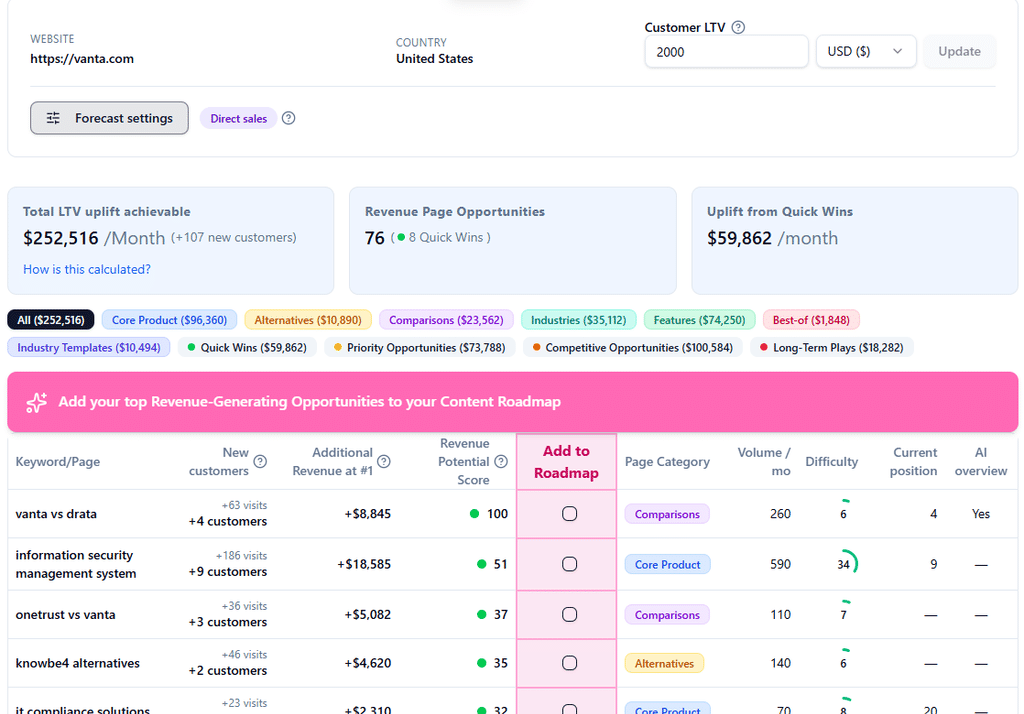
RevPages is an AI-powered SEO platform that finds commercially valuable keywords for your website, forecasts how many customers and how much revenue they could generate, and helps you prioritize the best opportunities.
Unlike traditional keyword research tools that give you thousands of keywords to sift through, RevPages focuses on identifying the pages most likely to generate sales and sign-ups.
How does it work?
Enter your website URL, target country and average customer lifetime value (LTV).
RevPages then analyses your website, products, competitors and existing Google rankings to identify the most valuable keywords for the business.
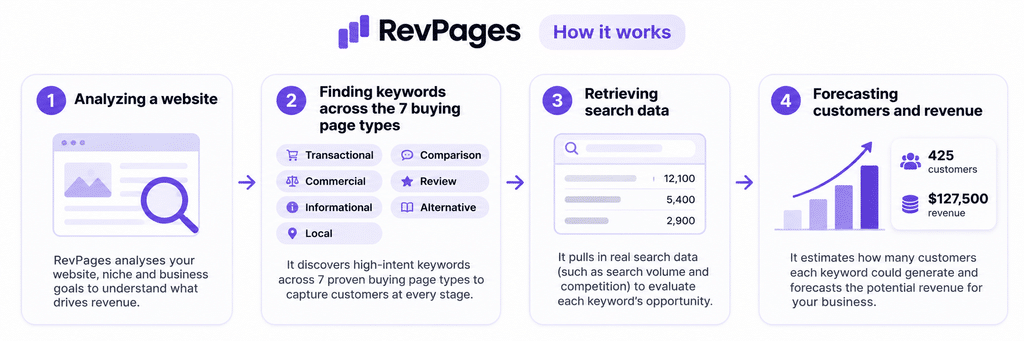
It focuses on seven types of commercially valuable pages that are proven to drive signups and revenue – and filters out low-intent searches.
Within around 90–150 seconds, you’ll receive a report containing approximately 30–60 keyword and page opportunities.
Each opportunity includes:
- Monthly search volume: How many people are searching for the keyword.
- Keyword difficulty: How competitive the search results are.
- Current Google ranking: Whether your website already ranks for the keyword.
- Revenue forecast: How much additional revenue the keyword could generate if you reached position one.
- Opportunity score: A measure combining revenue potential with ranking achievability.
Rather than leaving you to interpret all this data yourself, RevPages automatically prioritises the opportunities so you can quickly see which pages you should create first.
You can also add your own keywords to the report and get the same analysis and revenue forecasts.
RevPages doesn’t just recommend going after high-volume keywords.….
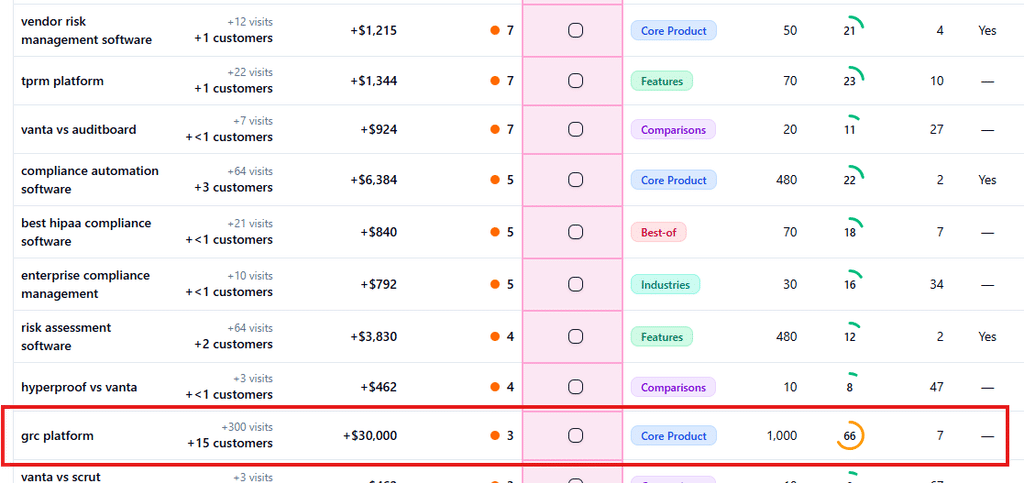
It prioritizes pages with high revenue potential that can be ranked relatively quickly.
For example here the 1,000 monthly search has high traffic potential, but with a difficult socre of 66 – it could take years to rank for it – so it recieves a low score and is not prioritized.
How does it actually use AI?
AI plays a central role in RevPages’ keyword discovery process.
First, it analyses your website to understand what your business sells, who your customers are, which industries you serve and how your products compare with competitors.
It then uses that understanding to generate relevant commercial keyword opportunities, rather than simply producing variations of a seed keyword.
For example, if you sell project management software, it might identify opportunities around project planning features that potential clients search for, or comparisons to popular platforms like Asana and Monday.com
RevPages combines these AI-generated ideas with real keyword data, including search volumes, difficulty scores and current rankings.
It then applies its revenue forecasting and opportunity scoring models to identify the most commercially attractive opportunities.
Importantly, the revenue calculations aren’t simply AI guesses. They’re based on a structured forecasting model using search demand, expected click-through rates, conversion rates and customer lifetime value.
You can modify the forecasts using your own CTR and conversion rate data, if you have any.
AI is also used later in the process to generate tailored SEO content briefs based on the target keyword, search intent and competing pages.
How much time will it save you?
Estimated time saving: 4–8 hours per keyword research project.
For a typical website, manually researching and prioritising 30–60 commercially valuable keyword opportunities can take several hours.
You’d normally need to:
- Analyse the company’s products, features, customers and competitors.
- Brainstorm relevant commercial keyword ideas.
- Research search volumes and keyword difficulty.
- Check existing rankings and identify content gaps.
- Assess the commercial value of each keyword.
- Calculate potential traffic, conversions and revenue.
- Organise and prioritise everything in a spreadsheet.
RevPages automates most of these tasks and produces a prioritised report in around two minutes.
You’ll still want to review the recommendations and check that they align with your business strategy, but it removes much of the repetitive research and spreadsheet work.
Does it find valuable keywords?
This is where RevPages is most useful – it prioritizes revenue potential over all other metrics
Many keyword research tools prioritise search volume, but high search volume doesn’t necessarily translate into sales.
For example, a keyword such as “what is project management” might attract thousands of searches every month, but relatively few visitors will be looking to buy software.
A keyword such as “project management software for architects” might have significantly lower search volume, but the people searching for it are much more likely to be potential customers.
RevPages focuses on these commercially relevant searches.
It also considers the financial value of each opportunity. By combining search volume, expected organic traffic, estimated conversion rates and customer LTV, it calculates how much additional revenue a keyword could potentially generate.
These are forecasts, not guaranteed results, but they provide a useful basis for comparing opportunities.
RevPages also factors keyword difficulty and existing rankings into its prioritisation, so the biggest opportunities aren’t necessarily the ones with the highest search volumes – meaning that it finds valuable keywords that you can rank for quickly.
The main limitation is that RevPages is designed primarily for lower-funnel SEO. If you’re looking to build a large informational blog or research thousands of broad topics, a more traditional keyword research platform may be more suitable.
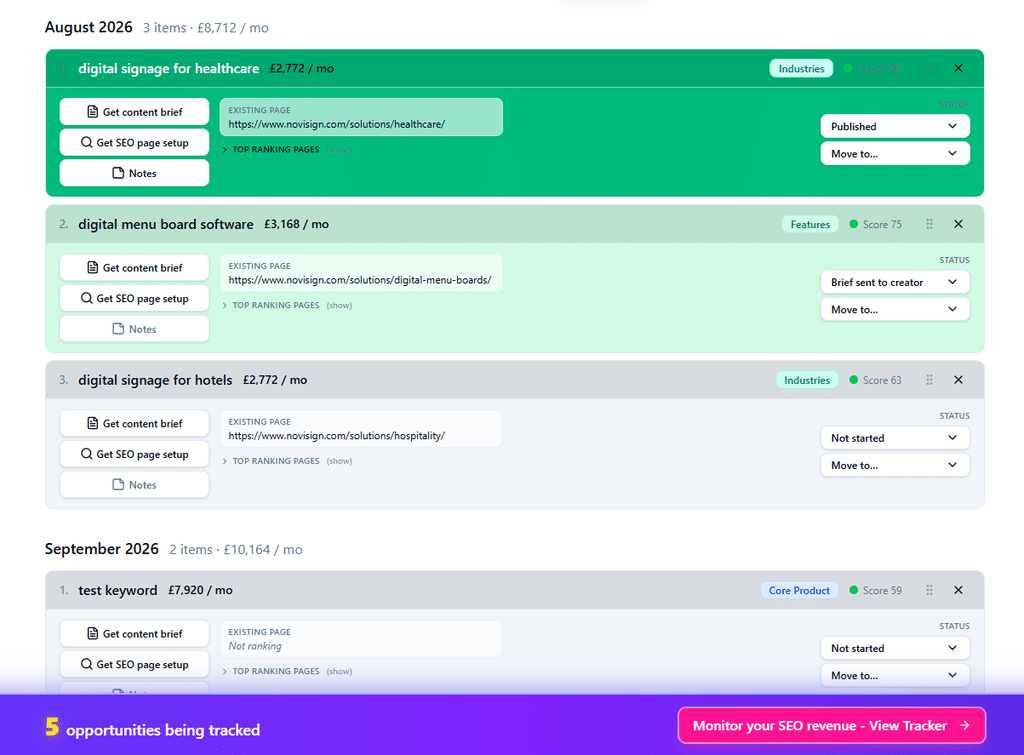
What other SEO functions does it help with?
RevPages goes beyond keyword discovery and helps turn research into an actionable SEO strategy.
- Content planning and production: Automatically creates a prioritised content roadmap based on revenue potential and ranking achievability. It also generates AI content briefs with suggested headings, topics, page titles, meta descriptions and URL structures.
- Link building: RevPages doesn’t provide backlink prospecting, outreach or link monitoring tools. However, its revenue forecasts can help you decide which existing pages are worth investing in when planning link-building campaigns.
- Rank tracking: Tracks rankings and estimated revenue performance for your important SEO pages, helping you identify ranking improvements, revenue declines and opportunities for further growth.
- Technical SEO: Provides basic on-page SEO recommendations through its content briefs, but doesn’t offer full technical site audits, crawling or error detection.
Who should use it?
RevPages is particularly well suited to SaaS businesses, B2B service providers and SEO agencies that want to focus their organic search efforts on generating customers rather than simply increasing traffic.
It’s especially useful for:
- In-house SEO and marketing teams looking to identify commercially valuable content opportunities and justify SEO investment.
- SEO agencies conducting keyword research for clients, building content strategies and forecasting potential returns.
- SaaS founders and small marketing teams who don’t have the time or resources to carry out extensive manual keyword research.
- Established websites looking to identify missing commercial pages or improve existing pages that already rank.
Its biggest strength is bringing keyword discovery, commercial analysis, revenue forecasting and content planning together in one workflow.
However, it isn’t intended to replace comprehensive SEO platforms such as Ahrefs or Semrush for backlink analysis, technical audits or large-scale keyword research.
Keyword Insights
Best for keyword clustering and content planning
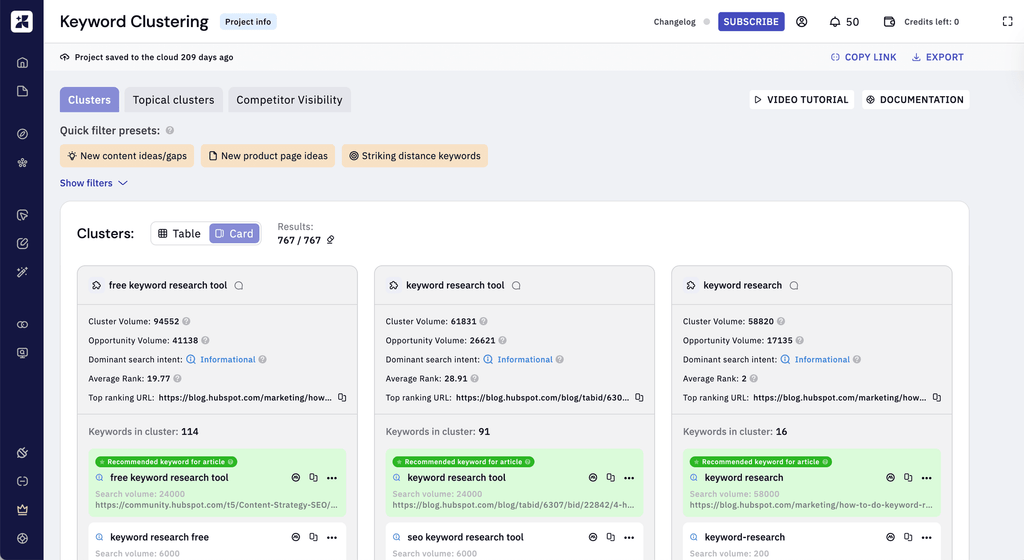
Keyword Insights is an AI-powered SEO platform that helps you discover keywords, group them into relevant topic clusters and turn them into structured content plans.
It’s particularly useful for organising large keyword lists and deciding which keywords should be targeted together on the same page, rather than creating lots of competing articles.
How does it work?
Start by entering a seed keyword, selecting your target country and language, and generating a list of related search terms.
You can also upload existing keyword lists from other SEO tools or use Google Search Console data.
Keyword Insights then analyses Google’s search results to group related keywords into clusters.
For example, if you research “project management software”, it might identify separate clusters around construction project management, agency project management and project management software comparisons.
Each cluster contains keywords that can potentially be targeted on the same page, along with useful metrics such as search volume, keyword difficulty and search intent.
You can then use these clusters to plan new pages, identify gaps in your existing content and generate AI-powered content briefs.
How does it actually use AI?
Keyword Insights combines AI with traditional search data and SERP analysis.
Its main keyword clustering feature compares Google’s search results to determine which keywords belong together. If two keywords return many of the same ranking pages, the tool identifies them as candidates for a single piece of content.
This is primarily automated SERP analysis rather than generative AI.
However, Keyword Insights also uses AI and natural language processing to help analyse topics, classify search intent and create content briefs.
Its AI writing features can analyse competing content, identify relevant subtopics and generate outlines or complete drafts.
So, while AI plays an important role in the overall workflow, the initial keyword discovery and clustering process isn’t entirely driven by generative AI.
How much time will it save you?
Estimated time saving: 2–5 hours per project.
Keyword Insights is particularly effective at removing the manual work involved in organising large keyword lists.
Normally, you’d need to examine search results for dozens or hundreds of keywords to decide which ones deserve separate pages and which can be grouped together.
Keyword Insights automates much of that process.
It also saves time when building content plans and briefs, because you can move directly from keyword clusters into content production.
However, you’ll still need to review the recommendations and decide which topics are worth prioritising.
Does it find valuable keywords?
Yes, particularly for websites looking to build topical authority and attract more organic traffic.
Keyword Insights helps you identify related searches, understand search intent and avoid creating multiple pages targeting essentially the same keywords.
Its search volume and difficulty metrics also help you assess the potential of each cluster.
However, it doesn’t primarily prioritise keywords according to the number of customers or amount of revenue they could generate.
For example, it might identify a large cluster of informational searches with significant traffic potential, but that doesn’t necessarily mean those visitors are likely to become customers.
You’ll still need to assess the commercial relevance of each opportunity yourself.
What other SEO functions does it help with?
- Content planning and production: Creates keyword clusters, content briefs and AI-generated articles. It also helps identify missing topics and build content strategies.
- Link building: Helps plan internal links between related pages, but doesn’t offer dedicated backlink prospecting or outreach tools.
- Rank tracking: Can incorporate existing ranking data into research, but isn’t primarily a dedicated rank-tracking platform.
- Technical SEO: Provides content and on-page optimisation recommendations, but doesn’t offer comprehensive technical SEO audits.
Who should use it?
Keyword Insights is particularly well suited to SEO agencies, content marketers, publishers and in-house teams managing large content libraries.
It’s especially useful if you already have a substantial list of keywords but aren’t sure how to organise them into a sensible content strategy.
It’s also a good choice for businesses planning to publish lots of informational content around a particular subject.
However, if your main priority is identifying keywords that are most likely to generate leads and sales, you’ll need to carry out additional commercial analysis.
Pricing
From $58/month
KeywordPilot
Best for turning a single keyword into an AI-generated content plan
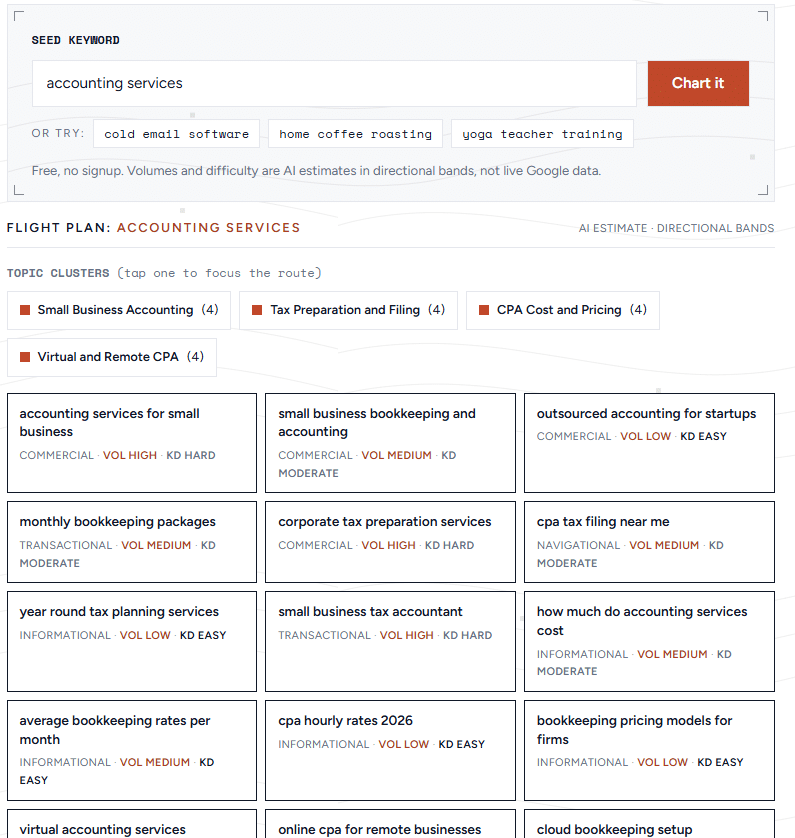
KeywordPilot is an AI-first keyword research tool designed to take a single seed keyword and turn it into a prioritised list of topics and articles.
Unlike conventional SEO platforms that provide thousands of keywords and leave you to organise them, KeywordPilot focuses on delivering a ready-to-use content plan.
How does it work?
Enter a broad keyword, such as “email marketing software”, into the tool.
KeywordPilot expands the term into related searches, long-tail keywords, questions and comparison queries.
It then groups the suggestions into topic clusters and assigns each keyword an estimated search volume, difficulty level and search intent.
The tool also recommends articles to create, including suggested titles, content angles and briefs.
The end result is a relatively simple publishing plan rather than a large spreadsheet of keyword data.
There’s a free demo that allows you to explore the process without creating an account.
How does it actually use AI?
AI is central to KeywordPilot’s workflow.
It uses AI to:
- Generate keyword variations and related topics from a seed keyword.
- Classify keywords by search intent.
- Organise keywords into content clusters.
- Estimate search demand and ranking difficulty.
- Recommend article topics, titles and content briefs.
This makes it one of the more genuinely AI-led keyword research tools on this list.
However, there’s an important limitation.
KeywordPilot’s search volume and difficulty figures are AI estimates, not measurements from a live Google keyword database.
The company explicitly describes these figures as directional bands.
This means they can be useful for initial brainstorming, but I wouldn’t rely on them alone when making significant SEO investment decisions.
I would personally want to check the numbers against one of the big SEO platforms’ databases first.
How much time will it save you?
Estimated saving: 2 – 4 hours per project.
KeywordPilot automates much of the initial brainstorming, clustering and content planning work.
Instead of manually generating keyword variations and organising them into a spreadsheet, you can move from one seed keyword to a proposed content plan in a single workflow.
However, if accurate search volumes and difficulty scores are important, you may need to verify the results using another platform.
That additional verification reduces the overall time saving.
Does it find valuable keywords?
It can find useful opportunities, particularly long-tail searches and content ideas you might not have considered.
Its intent classification also helps distinguish informational searches from commercial ones.
However, its AI-estimated search metrics make it harder to judge the actual size and competitiveness of an opportunity.
It also doesn’t appear to offer a dedicated revenue forecasting model.
I’d treat its recommendations as a starting point for research rather than a fully validated keyword strategy.
What other SEO functions does it help with?
- Content planning and production: Generates article recommendations, topic clusters, content angles and briefs.
- Link building: Suggests relationships between content pieces, but doesn’t provide dedicated backlink prospecting or outreach.
- Rank tracking: Paid plans support tracking keyword positions using connected Google Search Console data.
- Technical SEO: Doesn’t offer comprehensive technical SEO auditing.
Who should use it?
KeywordPilot is particularly suitable for bloggers, freelancers, small businesses and marketers who want to produce a content plan without learning a complex SEO platform.
It’s also useful for brainstorming new content ideas quickly.
I’d be more cautious about using it as the sole research tool for large client projects where reliable search volume and competition data are essential.
Pricing
$58–299/month
KWHero
Best for conversationall keyword research with AI search visibility
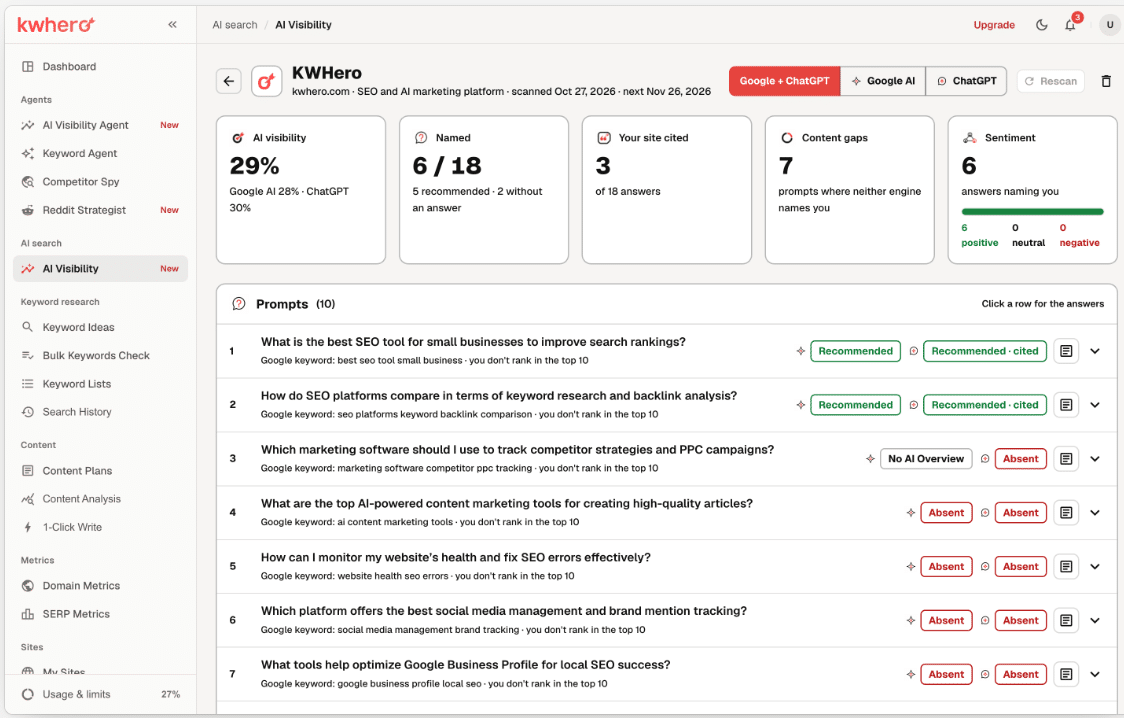
KWHero is an SEO research and content optimisation platform that combines traditional keyword metrics with AI-powered analysis and visibility tracking.
One of its most interesting features is the ability to research keywords while also examining their presence in Google’s AI Overviews.
How does it work?
KWHero provides keyword research, including search volumes, keyword difficulty and SERP analysis.
Users can discover keyword opportunities, examine competing pages and organise related keywords into clusters.
It also shows whether particular searches trigger a Google AI Overview and which websites Google cites.
The most unique feature KWHero offers is a Keyword Research Agent that can be accessed through an MCP-connected chat interface.
This allows keyword research to be incorporated into a conversational workflow rather than relying entirely on conventional dashboards.
How does it actually use AI?
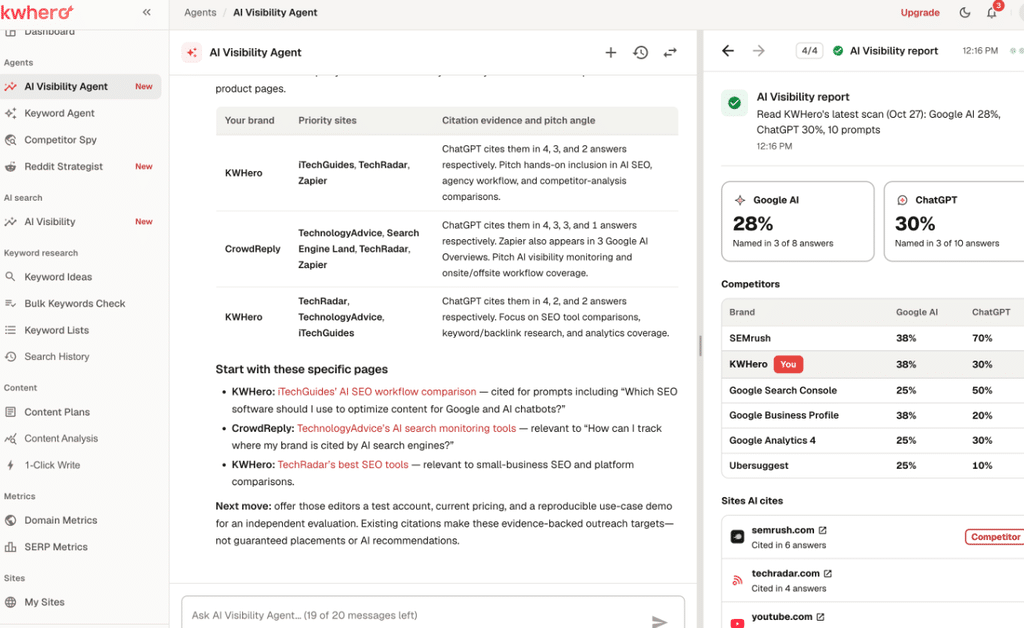
KWHero uses AI in several distinct ways:
- Conversational keyword research: Its Keyword Research Agent allows research workflows to be performed through an AI-connected interface.
- AI visibility analysis: The platform examines how brands appear in AI-generated search answers.
- Prompt generation: For AI visibility monitoring, it analyses a business and generates relevant questions that potential customers might ask AI systems.
- Content optimisation: It analyses entities, topics and subtopics to recommend improvements to content.
- Content creation: AI assists with content briefs, planning and writing.
However, simply displaying whether Google shows an AI Overview for a keyword isn’t itself generative AI keyword research.
It’s an additional search data point.
The distinction is important because KWHero’s keyword discovery still uses conventional keyword metrics alongside its AI features.
How much time will it save you?
Estimated saving: 2 – 4 hours per project.
KWHero can reduce the time spent gathering keyword data, examining SERPs, clustering keywords and investigating AI search visibility.
Its agent-based workflow could also reduce the need to move between reports when researching related opportunities.
However, the precise time saving depends on how effectively the agent handles your particular research tasks.
Does it find valuable keywords?
Yes, particularly if you’re interested in both conventional Google rankings and AI search visibility.
Search volume, difficulty and SERP analysis help assess traditional SEO opportunities, while AI Overview data provides additional context.
For example, you might discover a keyword where Google frequently displays an AI Overview citing competitors.
That could be useful when deciding whether to create content intended to compete for organic rankings and AI citations.
However, appearing in an AI Overview doesn’t necessarily translate into website visits or sales, so commercial value still needs to be assessed separately.
What other SEO functions does it help with?
- Content planning and production: Provides content analysis, AI-assisted briefs, content plans and writing tools.
- Link building: Identifies citation opportunities through AI visibility analysis and supports internal linking, but isn’t a full backlink outreach platform.
- Rank tracking: Offers keyword and SERP analysis, although its current positioning emphasises AI visibility monitoring rather than conventional rank tracking.
- Technical SEO: Provides content optimisation recommendations but isn’t a comprehensive technical auditing platform.
Who should use it?
KWHero is particularly relevant for SEO agencies, content marketers and businesses looking to incorporate AI search visibility into their SEO strategy.
Verdict: An interesting combination of keyword research, AI agents and AI search visibility, although not every part of its keyword discovery process is AI-driven.
Pricing
$49–598/month
MarketMuse
Best for AI-powered topical authority analysis and personalised keyword difficulty
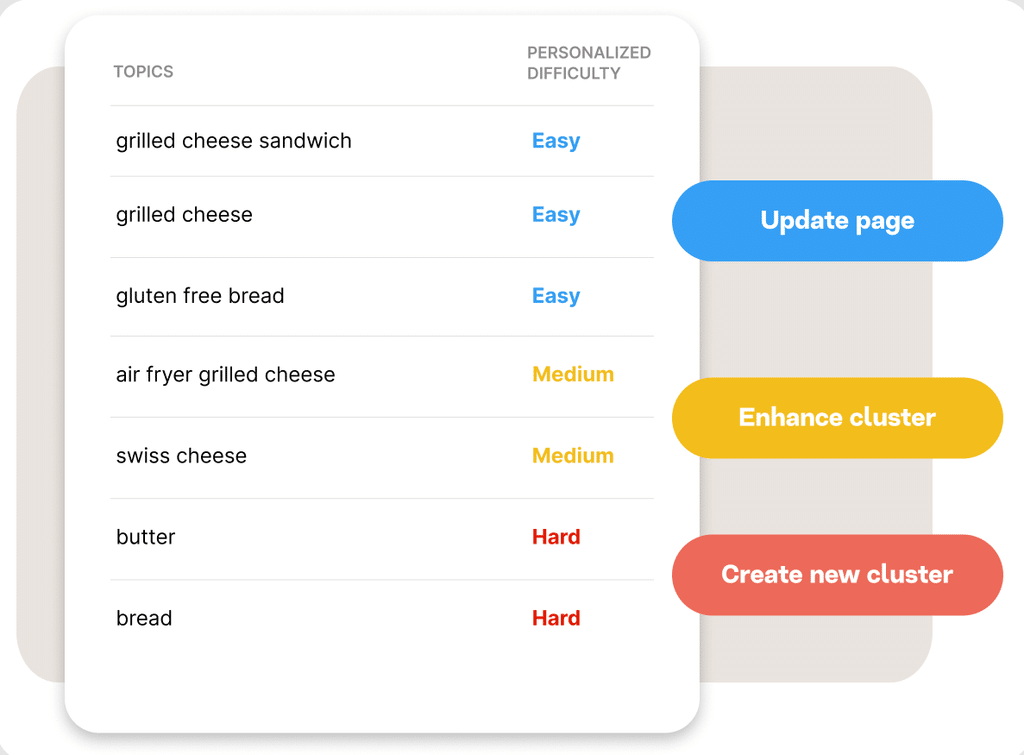
MarketMuse is an AI-powered content strategy platform that helps businesses identify topics they should cover, understand their existing topical authority and prioritise opportunities they have a realistic chance of ranking for.
Unlike traditional keyword research tools, MarketMuse looks beyond individual keywords and considers how well your website covers an entire subject.
How does it work?
MarketMuse allows you to research individual topics or analyse your website’s existing content.
Enter a seed keyword into its Research application and it generates a topic model containing related keywords, questions and relevant subtopics.
It also provides search volumes, ranking information, competition metrics and content recommendations.
Where things get interesting is its personalized analysis.
MarketMuse examines your website’s existing content and rankings to understand which subjects you already cover well.
It then calculates two useful metrics:
- Topic Authority: How strong your website’s existing coverage and search performance are for a particular topic.
- Personalised Difficulty: How difficult it would be for your specific website to rank for that topic.
For example, two websites researching “project management software” might receive different difficulty assessments because one already has substantial content and authority around project management.
You can use these metrics to identify new content opportunities, improve existing pages and build topic clusters.
How does it actually use AI?
AI is fundamental to MarketMuse’s research process.
Its topic modelling technology identifies semantic relationships between subjects, allowing it to recommend related concepts rather than simply generating keywords containing similar words.
It also analyses your website’s existing topical coverage to assess where you have a competitive advantage.
The main applications include:
- Topic modelling: Identifying related concepts, questions and subjects that should be covered together.
- Topical authority analysis: Evaluating how comprehensively your website covers particular subjects.
- Personalised difficulty: Combining keyword competition with your website’s existing topical authority.
- Content gap analysis: Identifying missing topics and opportunities to strengthen existing content.
- Content recommendations: Producing briefs and suggesting improvements based on competing content.
MarketMuse doesn’t publicly disclose every algorithm behind these features, but AI-based topic modelling is central to the product rather than an optional addition.
How much time will it save you?
Estimated saving: 3 – 6 hours per project.
MarketMuse can substantially reduce the time spent manually reviewing existing content, researching competing websites and identifying topical gaps.
It’s particularly useful for established websites with hundreds of articles, where assessing topical coverage manually would be difficult.
However, there is still work involved in interpreting the recommendations and deciding which topics align with your commercial objectives.
Does it find valuable keywords?
Yes, and its personalised difficulty metrics are very useful.
Traditional keyword difficulty scores generally assess how competitive a search is without fully considering your website’s existing strengths.
MarketMuse takes your topical authority into account, helping identify opportunities that may be more achievable for your website than for competitors.
It also includes a Potential Value metric, which estimates the theoretical financial value of a topic using search volume and an estimated value per visit, with CPC used as the default.
This can help prioritise opportunities, although it isn’t the same as forecasting actual customer conversions and revenue.
One limitation is that strong topical relevance doesn’t automatically mean strong commercial intent. You’ll still need to assess whether the suggested topics are likely to attract customers.
What other SEO functions does it help with?
- Content planning and production: Generates topic clusters, content briefs, content recommendations and optimisation guidance.
- Link building: Provides internal linking recommendations to strengthen topical relationships, but doesn’t offer dedicated backlink outreach.
- Rank tracking: Incorporates current and historical rankings into its content inventory and opportunity analysis.
- Technical SEO: Analyses content quality and topical coverage, but isn’t a comprehensive technical SEO crawler.
Who should use it?
MarketMuse is particularly suitable for established websites, publishers, content marketing teams and SEO agencies managing large content libraries.
It’s especially useful when you’re trying to build authority around a subject or decide which existing content to improve.
Smaller websites with only a handful of pages may not benefit as much from its extensive topical analysis.
Pricing
From $99/month
Semrush
Best all-in-one SEO platform with AI-assisted keyword research
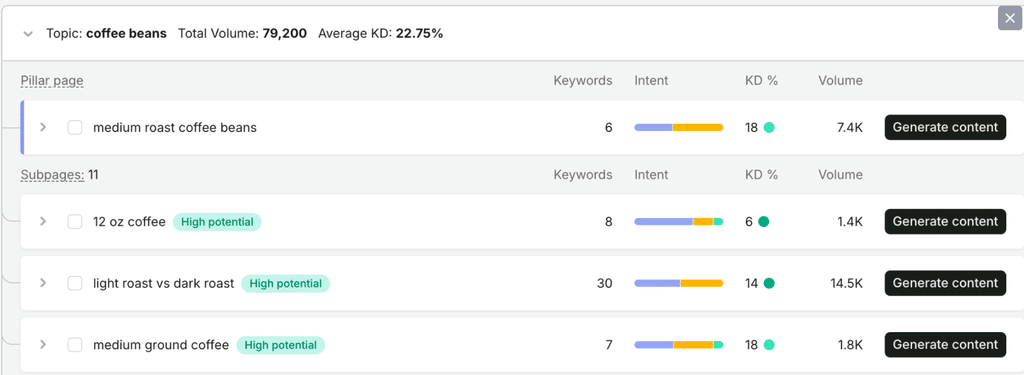
Semrush is one of the most established SEO platforms, offering keyword research, competitor analysis, rank tracking, backlink research and technical SEO auditing.
Although it wasn’t originally built as an AI keyword research tool, it now includes several AI-powered features that make keyword discovery and prioritisation considerably more efficient.
The two most relevant are Keyword Strategy Builder and Personal Keyword Difficulty.
How does it work?
Semrush offers several ways to research keywords.
Its Keyword Magic Tool allows you to enter a seed keyword and explore related searches, complete with search volume, difficulty, intent and competition metrics.
You can also enter your website into its AI-powered filters to identify keywords that may be particularly achievable for your domain.
For a more automated approach, Keyword Strategy Builder allows you to enter up to five seed keywords.
Semrush then generates a structured content plan containing related topics, pillar pages and supporting pages.
Each recommended page includes associated keywords, search volumes, difficulty scores and search intent.
You can filter the results to prioritise different objectives, including commercial searches, traffic opportunities and balanced content strategies.
Semrush also lets you send keywords into its content creation tools or Position Tracking feature.
How does it actually use AI?
Semrush uses AI in several parts of the keyword research process.
Its most clearly documented AI application is Personal Keyword Difficulty (PKD).
Unlike conventional keyword difficulty, PKD uses a proprietary AI algorithm to estimate how difficult it would be for your particular website to rank in Google’s top ten.
The model considers factors including:
- How relevant your website is to the keyword.
- The competitiveness of the topic.
- Your website’s existing authority and performance.
- The characteristics of competing websites in the search results.
Semrush also uses automated analysis to group related keywords into topic clusters and build content strategies.
However, it doesn’t clearly document which parts of Keyword Strategy Builder use generative AI rather than conventional clustering algorithms.
Its AI-powered research filters and personalised difficulty calculations are more defensible examples of AI being applied directly to keyword research.
How much time will it save you?
Estimated saving: 2 – 5 hours per project.
Keyword Strategy Builder can eliminate much of the manual work involved in grouping keywords, planning pillar pages and creating content strategies.
Personal Keyword Difficulty also reduces the need to manually investigate whether a keyword is realistic for your website.
However, Semrush still requires more hands-on analysis than tools designed to deliver a finished shortlist of opportunities automatically.
You’ll generally need to choose seed keywords, apply filters and evaluate the resulting opportunities.
Does it find valuable keywords?
Yes. Semrush is particularly strong here because it combines a large keyword database with search intent classification and personalised ranking difficulty.
Its Keyword Strategy Builder includes a Quick Conversions filter, which highlights keywords with commercial or transactional intent.
This is useful for identifying searches more likely to attract potential customers.
You can also examine estimated traffic potential and keyword difficulty to decide which opportunities are worth pursuing.
However, Semrush doesn’t automatically turn every keyword opportunity into a forecast of customer sign-ups or sales revenue.
You’ll still need to combine its research with your own conversion rates and customer value data to estimate the financial return.
What other SEO functions does it help with?
- Content planning and production: Creates topic clusters, SEO briefs, content recommendations and AI-assisted articles.
- Link building: Offers backlink analysis, competitor link research, backlink gap analysis and link-building prospecting tools.
- Rank tracking: Provides dedicated position tracking, visibility reports and competitor ranking comparisons.
- Technical SEO: Includes comprehensive site auditing, crawling and technical issue detection.
Who should use it?
Semrush is suitable for SEO agencies, in-house marketing teams and businesses that want a comprehensive SEO platform rather than a specialist keyword research tool.
It’s particularly useful if you want to combine AI-assisted research with technical SEO, backlink analysis and ongoing performance monitoring.
For smaller businesses focused exclusively on keyword discovery, its breadth of functionality may be a bit overkill.
Ahrefs
Best for AI-assisted keyword discovery and detailed competitor research
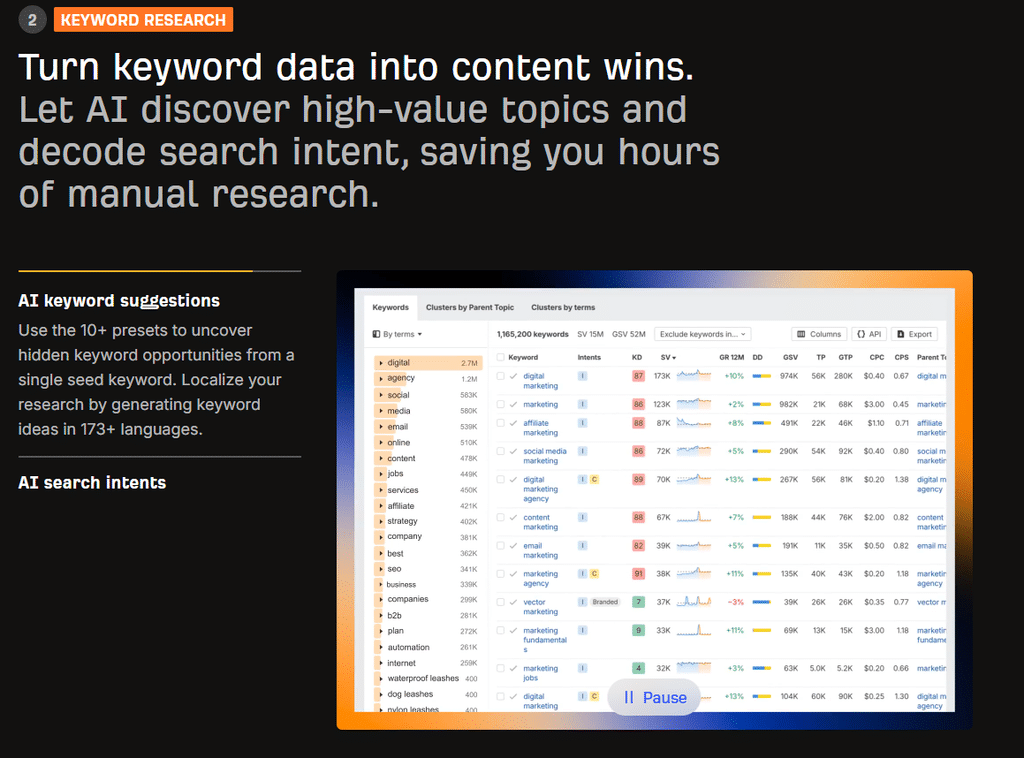
Ahrefs is a comprehensive SEO platform best known for its keyword research, backlink analysis and competitor intelligence tools.
Its Keywords Explorer has traditionally relied on extensive search data, but Ahrefs has introduced several AI-powered features that help users discover new keyword ideas and understand search intent.
These include AI Suggestions, AI Search Intent and AI Translations.
How does it work?
Start by entering one or more seed keywords into Ahrefs’ Keywords Explorer.
The platform returns related searches, keyword variations, search volumes, difficulty scores and traffic estimates.
You can explore keywords containing your original phrase, discover related searches that competing pages rank for, or investigate Google’s autocomplete suggestions.
The AI Suggestions feature adds another approach to keyword discovery.
Rather than relying entirely on existing keyword relationships, it uses AI to generate additional keyword ideas.
You can then investigate these suggestions using Ahrefs’ conventional keyword metrics.
Another useful feature is AI Search Intent, which analyses the pages appearing in Google’s search results to identify the different intentions behind a particular search.
This helps you understand what type of content Google is rewarding and whether your proposed page is likely to satisfy the search.
How does it actually use AI?
Ahrefs uses AI directly in three important keyword research features:
- AI Suggestions: Generates additional keyword ideas beyond conventional matching-term and related-term searches.
- AI Search Intent: Analyses and groups search results according to the intent they satisfy.
- AI Translations: Uses AI to translate keyword ideas into other languages for international research.
AI Search Intent is particularly interesting.
Some keywords have multiple meanings or attract people with different objectives.
For example, someone searching for “CRM software” might want a product comparison, a list of recommendations or a specific CRM provider.
Ahrefs analyses the actual search results to help identify these different intentions.
However, AI isn’t responsible for the entire keyword research process.
Search volumes, keyword difficulty, backlink metrics and traffic estimates still come from Ahrefs’ established data and analytical systems.
As of September 2026, its AI Suggestions, AI Search Intent and AI Translations features require a Standard subscription or higher.
How much time will it save you?
Estimated saving: 1 – 3 hours per project.
AI Suggestions can reduce the time spent brainstorming additional keyword ideas, while AI Search Intent can speed up SERP analysis.
However, Ahrefs remains a relatively hands-on keyword research platform.
You’ll still need to evaluate opportunities, apply filters, compare competitors and decide which keywords are worth targeting.
Its AI features improve parts of the workflow rather than automating the entire research process.
Does it find valuable keywords?
Yes. Ahrefs is particularly effective for finding opportunities based on actual search demand and competitor performance.
You can investigate which keywords competing websites rank for, identify gaps in your own rankings and filter opportunities by difficulty, traffic potential and intent.
Its AI features make it easier to expand your research and understand what searchers are looking for.
However, Ahrefs doesn’t automatically prioritise every keyword according to the sales or revenue it could generate for your business.
You’ll still need to evaluate commercial relevance and estimate potential conversions separately.
What other SEO functions does it help with?
- Content planning and production: Provides keyword ideas, content gap analysis, AI-assisted content recommendations and content research tools.
- Link building: Offers extensive backlink analysis, competitor link research, broken link discovery and link prospecting data.
- Rank tracking: Includes dedicated keyword rank tracking and historical performance reporting.
- Technical SEO: Provides a comprehensive Site Audit tool for identifying technical problems, crawlability issues and on-page SEO errors.
Who should use it?
Ahrefs is particularly suitable for experienced SEO professionals, agencies and in-house marketing teams that want detailed control over their research.
It’s especially useful for competitor-led keyword discovery and projects where backlink analysis and technical SEO are also important.
However, businesses looking for a fully automated AI keyword research process may find that it still involves considerable manual work.
Surfer
Best for AI-assisted topic research and content optimisation
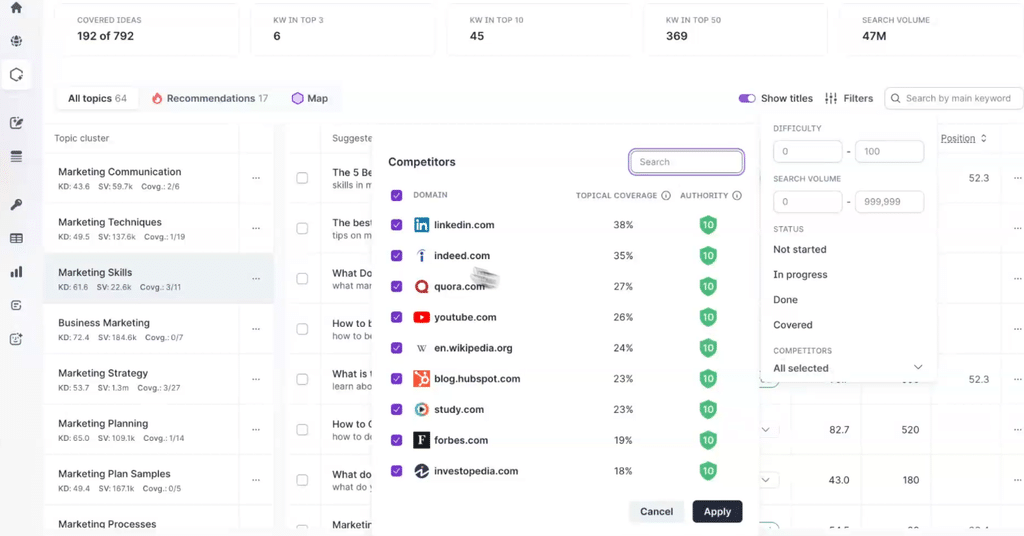
Surfer is an SEO content optimisation platform that helps businesses discover relevant keywords, organise them into topic clusters and create content designed to rank in Google.
Although it’s best known for its Content Editor and AI writing tools, Surfer also offers keyword research and content planning features.
Its main strength is connecting keyword discovery with content production, allowing users to move from researching a topic to creating an optimised article within the same platform.
How does it work?
Surfer’s Keyword Research tool starts with a seed keyword and a target location.
It analyses Google’s search results to identify related searches, the keywords competing pages rank for and how those keywords can be grouped into clusters.
Each cluster includes a main keyword, supporting keywords, search intent and content optimisation benchmarks.
For example, researching “email marketing” might produce clusters covering email marketing software, automation, templates and campaign strategies.
You can then decide which clusters deserve individual pages and which keywords should be covered together.
Surfer also offers Topic Research and Topical Map.
Topic Research is designed for discovering new content ideas around a particular subject.
Topical Map takes a broader approach, helping you plan your website’s content structure, identify missing topics and organise pages into a coherent strategy.
It can connect to Google Search Console to incorporate information about your existing website.
Once you’ve selected an opportunity, you can send the keywords directly into Surfer’s Content Editor to create a brief or begin writing.
How does it actually use AI?
Surfer uses AI extensively in content creation and optimisation, but its keyword research functionality is more of a mixture of automated SERP analysis and AI-assisted planning.
The main areas include:
- Semantic topic analysis: Identifies relationships between keywords and groups them into relevant topics.
- Search intent analysis: Uses search result information to organise keywords according to what users are looking for.
- Content planning: Helps identify gaps in topical coverage and recommends relevant content opportunities.
- AI content briefs: Generates content recommendations and outlines based on the keywords and competing pages.
- AI content generation: Produces draft articles and helps optimise content for target keywords.
However, Surfer’s documentation explains that its keyword research primarily works by analysing actual Google search results and the keywords competing pages rank for.
It doesn’t clearly establish that generative AI drives the initial keyword discovery process.
So, while Surfer makes extensive use of AI throughout the content workflow, its keyword research is better described as AI-assisted rather than fully AI-generated.
How much time will it save you?
Estimated saving: 2 – 4 hours per project.
Surfer can reduce the time spent researching related keywords, organising them into clusters and deciding which topics should become separate articles.
Its biggest time-saving advantage is the connection between research and content creation.
Instead of exporting keywords into another platform, you can move directly into a content brief and optimisation workflow.
However, you’ll still need to assess which topics are commercially relevant and decide which opportunities deserve priority.
Does it find valuable keywords?
Yes, particularly for businesses building content around a defined subject.
Surfer’s clustering and topical mapping features help identify relevant searches, content gaps and opportunities to build topical authority.
Its keyword research also provides search volume, difficulty and search intent information.
However, Surfer primarily focuses on topical relevance, search visibility and content optimisation rather than financial value.
A recommended topic might help your website build authority without necessarily attracting visitors who are ready to buy.
For businesses focused on lead generation or sales, additional commercial analysis may be needed.
What other SEO functions does it help with?
- Content planning and production: Provides topic research, topical maps, AI content briefs, a Content Editor, AI writing and automated content optimisation.
- Link building: Offers internal linking recommendations and automated contextual internal linking, but doesn’t provide comprehensive external backlink prospecting or outreach.
- Rank tracking: Its Content Audit functionality monitors connected pages’ positions, impressions and traffic through Google Search Console data.
- Technical SEO: Provides content auditing and on-page optimisation recommendations, but isn’t a full technical SEO auditing platform.
Who should use it?
Surfer is particularly suitable for content marketers, bloggers, publishers and SEO agencies that regularly produce search-optimised articles.
It’s especially useful for teams looking to connect keyword research, content planning, writing and optimisation within one workflow.
However, businesses primarily interested in identifying high-intent commercial keywords and forecasting their financial return may need additional tools.
Pricing
From $59/month